Autosave Preferences
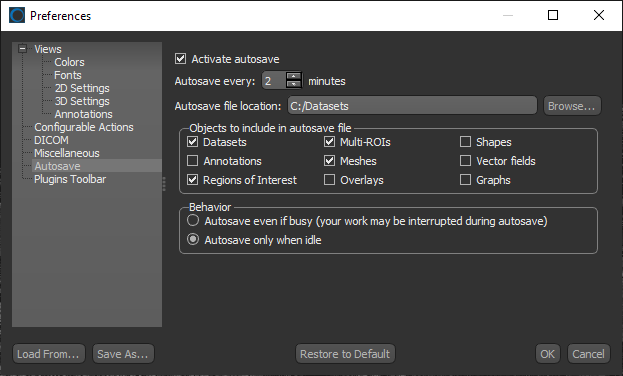
The Autosave options help reduce the risk or impact of data loss in case of a software crash or freeze. Autosaving can be configured for predetermined intervals or activated before beginning a complex editing task. Choose Autosave in the Preferences dialog to open the Autosave preferences, shown below.
Autosave preferences
|
|
Description |
|---|---|
|
Activate autosave |
If checked, the objects selected to be included in the autosave file will be saved at the set interval. |
|
Autosave every |
Lets you set the frequency for autosave. |
|
Autosave file location |
Lets you choose a location for the autosave file. |
|
Objects to include in autosave file |
Lets you choose which objects will be included in the autosave file — datasets, annotations, regions of interest, multi-ROIs, meshes, and so on. |
|
Behavior |
Lets you choose an autosave behavior — either always at the prescribed interval or only if Dragonfly is idle. |

 LEARNING LINKS

